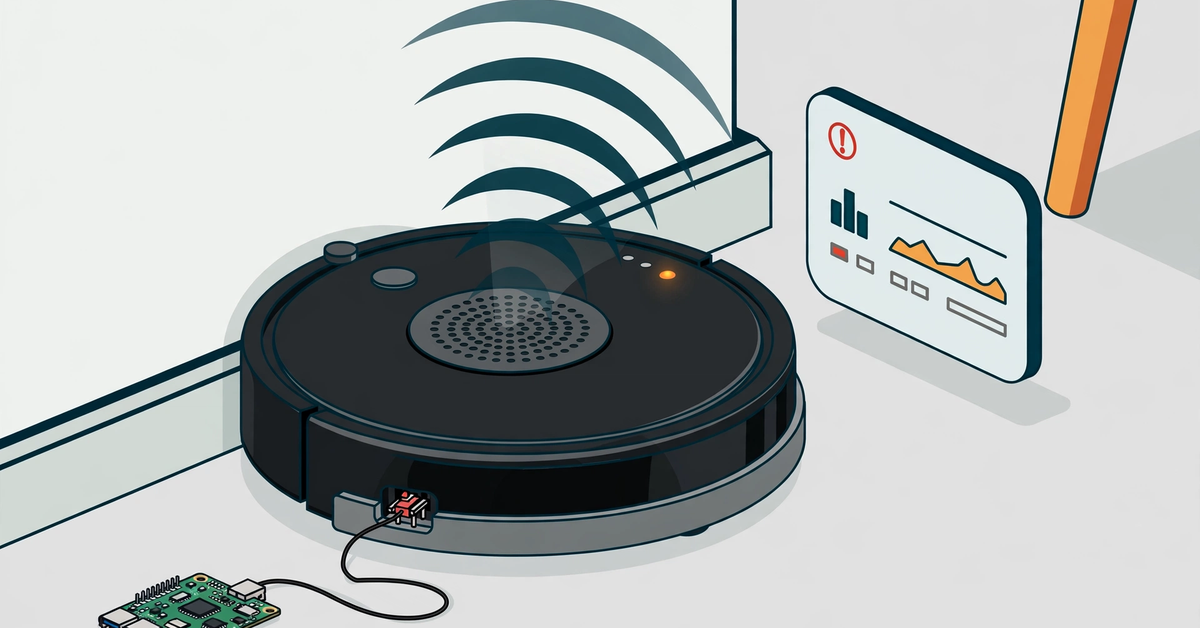
It screams when it hits a wall. Same.
A robot vacuum bumps into things all day and says nothing about it. It just quietly turns around, like a polite guest who walked into a door and pretended it did not happen. Mine yells, then writes down what hurt it in a file called a pain report, like it is filing an insurance claim against my skirting board. This is the safe version. No taser, no shock, no laser, nothing that fires at a person or a pet. Just a bump sensor, a speaker, and a sound file. Every number in this post comes from the simulated demo, run on a laptop with no robot hardware. No robot moved. No wall was hit. The bumps are fake, the timeline is virtual, and the scream is a generated tone.
Why a Normal Robot Vacuum Is Boring
A normal robot vacuum is a disc with trust issues. It drives forward, hits a chair leg, backs up, tries again, hits the same chair leg, and learns nothing. It does this for an hour, in silence. Bumping into things is its job. It has no map it respects and a body shaped like a dinner plate. Of course it hits walls. The problem is that it suffers in silence, so you have no idea what it has been through. Did it hit the wall once, or spend twenty minutes arguing with the same table leg? You will never know.
So I gave it a voice. One sensor, one speaker, and a rule: if you hit something, say so. Underneath the joke, it is real engineering: bump detection, switch bounce, and a cooldown timer are the same ideas inside doorbells, game controllers, and factory machines.
What You Need
You need a Raspberry Pi, any model that runs Python 3; a normally-open microswitch, the little clicky kind with a lever, as the bump sensor; a speaker, USB or the Pi’s audio jack; a few jumper wires, a front bumper or stiff plastic to press the switch, and a power supply for the Pi.
The code uses only the Python standard library, so there is nothing to install. The scream is not downloaded: the code generates it the first time it runs, as a tone that sweeps down in pitch, not a recording of a person screaming. If you do not have a Pi yet, you can still build this on a laptop. The simulated mode fakes the bumps and writes the same pain report a real robot would write. That is how I tested it, and where every number in this post comes from.
How It Works
A switch on the bumper, a sound, and a log.
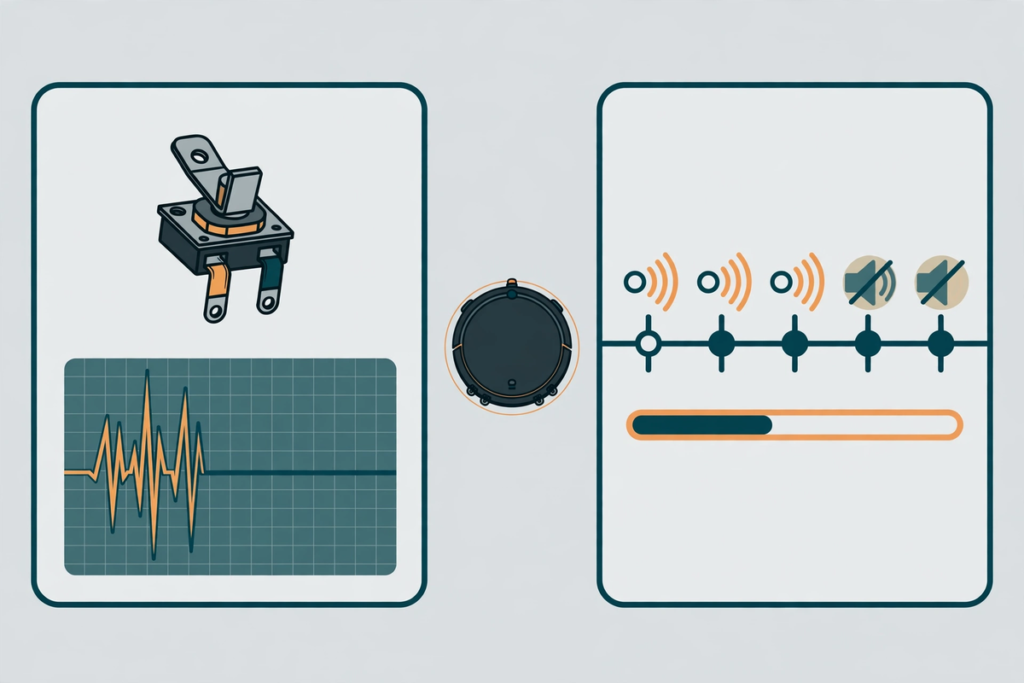
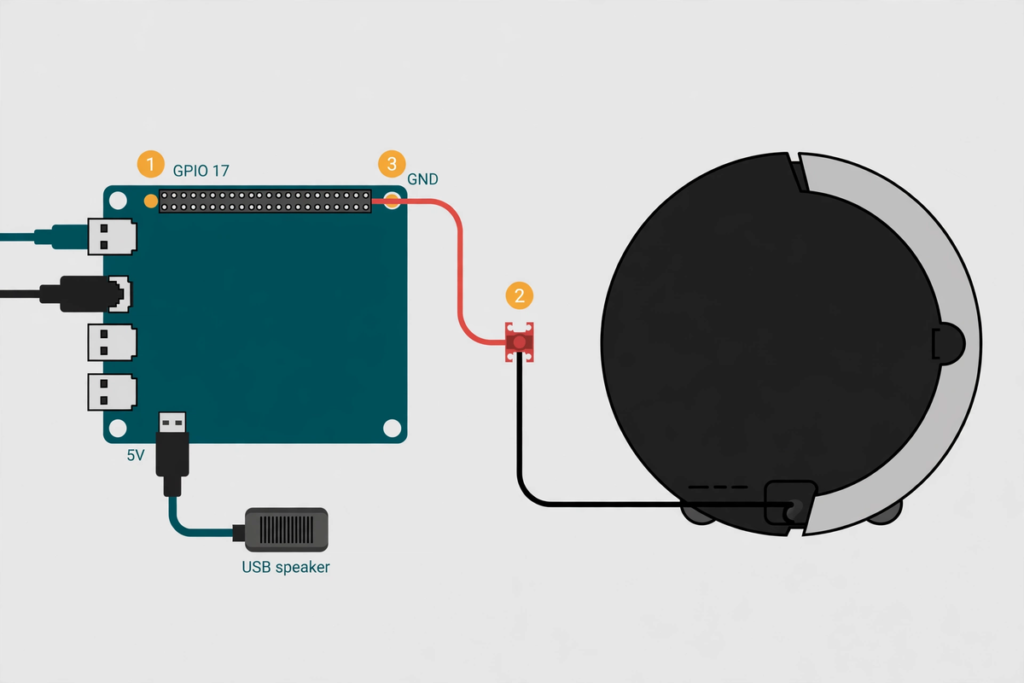
When the robot drives into a wall, the bumper presses the microswitch and the switch closes. On the Pi, that switch is wired between GPIO pin 17 and ground, with the Pi’s internal pull-up resistor turned on. The pin normally reads high, and the moment the switch closes it gets pulled low. That falling edge is the robot saying “ouch”. That signal goes through two filters before anything screams: debounce, then a cooldown.
Debounce first. A mechanical switch does not close cleanly once. It bounces: the contacts slap together, spring apart, and slap together again, several times, in a few milliseconds. To the Pi, one hit looks like three or four hits arriving almost at once. Without debounce, one bump becomes a burst of screams. So the code ignores any new edge within 200 milliseconds of the last accepted bump. One hit, one bump.
Then the cooldown. A scream is funny once. It is less funny the fifth time in four seconds, when the robot is wedged in a corner. So after every scream, the robot stays quiet for 2.0 seconds, even if it bumps again. A bump inside that window still gets written in the pain report, marked as silenced by the cooldown. When a bump passes both filters, the code plays scream.wav, a 1.20-second tone from scream.py, then writes one entry to the pain report, in JSON and CSV, with the bump number, the time, and whether it screamed or was silenced. On a real Pi, roomba.py with no arguments listens on GPIO 17 and waits. On a laptop, python3 roomba.py --simulate --bumps 5 runs the demo, with fake bumps 1.0 second apart, each producing 3 raw sensor edges at +0.00, +0.05 and +0.11 seconds, to imitate a real switch bouncing.
The Maths
Here it is, with the real numbers from the simulated demo, and nothing else. The demo asked for 5 bumps. Each bump made 3 raw edges, because a bouncing switch does not close once, it closes three times in quick succession. So the total was 5 × 3 = 15 raw edges. If you counted raw edges, you would think the robot hit 15 walls. It did not. It hit 5. Debounce sorts that out: the window is 200 milliseconds, or 0.20 seconds. The extra edges for each bump arrive at +0.05 and +0.11 seconds, both inside that window, so both get thrown away. That is 2 ignored edges per bump, or 5 × 2 = 10 bounces ignored. Then 15 − 10 = 5 accepted bumps.
Now the cooldown. The bumps arrive 1.0 second apart, on a virtual timeline starting at 0.00 seconds, so the five accepted bumps land at t = 0.00 s, 1.00 s, 2.00 s, 3.00 s and 4.00 s. The cooldown is 2.0 seconds. A bump only screams if at least 2.0 seconds have passed since the last scream:
- Bump 1 at t = 0.00 s. No scream before it, so it screams.
- Bump 2 at t = 1.00 s. Only 1.00 second since the last scream, so it is silenced, with 1.0 second left.
- Bump 3 at t = 2.00 s. Exactly 2.00 seconds since the last scream, so it screams.
- Bump 4 at t = 3.00 s. Only 1.00 second since the last scream, so it is silenced again.
- Bump 5 at t = 4.00 s. Exactly 2.00 seconds since the last scream, so it screams.
Count them up: 3 screams, 2 silenced by the cooldown, out of 5 accepted bumps. The scream rate is 3 out of 5, or 60 percent. Each scream is 1.20 seconds long, so the total screaming was 3 × 1.20 = 3.60 seconds. The sound file is 52,920 frames at 44,100 samples per second: 52,920 ÷ 44,100 = 1.20. The file on disk is 105,884 bytes. So the demo, in one line: 15 raw edges became 5 bumps, which became 3 screams and 2 silenced hits, across 4.00 seconds. All simulated.
Build It
Wire the switch first, while the Pi is off. Connect one side of the microswitch to GPIO 17 and the other side to any ground pin. That is the whole circuit; the code turns on the internal pull-up, so you do not need a resistor. Mount the switch behind the bumper, so pressing the bumper clicks it. Plug the speaker in, USB or audio jack.
The folder holds roomba.py (bump handling, scream trigger, cooldown, pain-report log), scream.py (generates scream.wav with stdlib wave/math, plays it), config.py (GPIO pin, debounce, cooldown, sound settings), requirements.txt (stdlib only; RPi.GPIO only on a real Pi), README.md, scream.wav (generated on first run, 1.20 s, 44100 Hz), and logs/ and sample_data/, each with pain-report.json and pain-report.csv. Three Python files, each doing one job: settings, sound, and the brain.
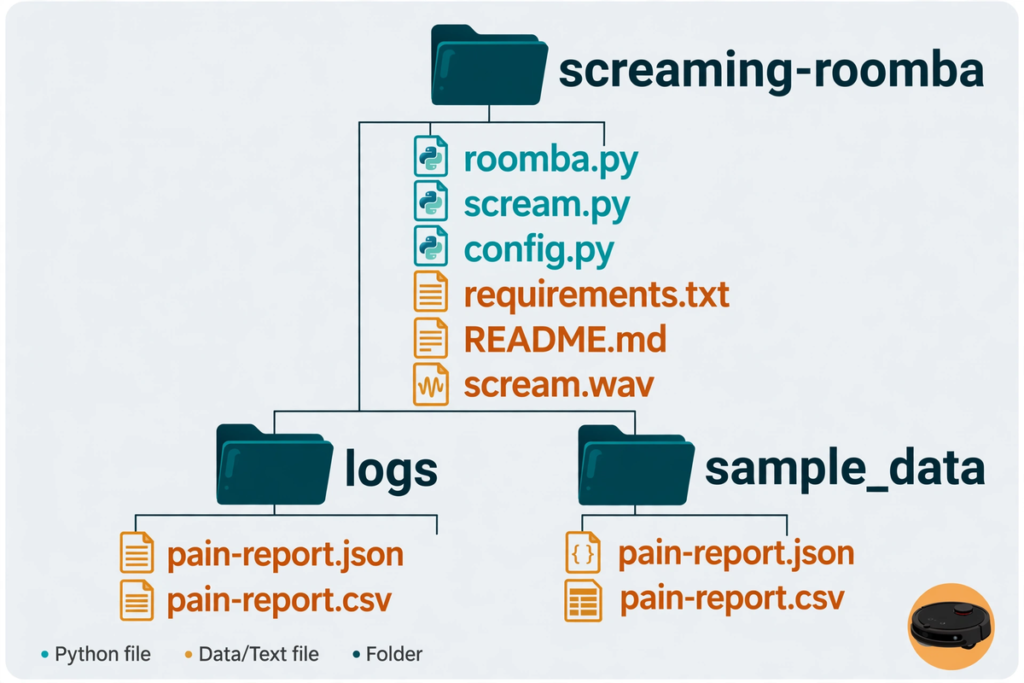
The settings live in config.py:
BUMP_PIN = 17
DEBOUNCE_MS = 200
COOLDOWN_SECONDS = 2.0
SIMULATED_BUMP_INTERVAL_SECONDS = 1.0
SCREAM_FILE = "scream.wav"
SCREAM_DURATION_SECONDS = 1.2
SCREAM_SAMPLE_RATE = 44100
The scream is generated, not downloaded: scream.py writes a WAV file using only the standard library, sweeping a tone from 900 Hz down to 300 Hz over 1.20 seconds, with a 12 Hz wobble and a sharp attack. Run python3 scream.py on its own and it prints Generated scream.wav: 105884 bytes, 1.20 s at 44100 Hz. The simulation in roomba.py builds the fake bump events first, three raw edges per bump:
def build_raw_events(num_bumps):
    events = []
    for bump in range(1, num_bumps + 1):
        base = (bump - 1) * config.SIMULATED_BUMP_INTERVAL_SECONDS
        for offset in (0.00, 0.05, 0.11):
            events.append((round(base + offset, 2), bump))
    return sorted(events)
Every accepted bump, screamed or silenced, becomes one entry in the pain report, written as both JSON and CSV. Run the demo on any laptop, with no Pi and no hardware:
python3 roomba.py --simulate --bumps 5There is nothing to install first: requirements.txt is empty on purpose, and RPi.GPIO is only needed on a real Pi. To run it for real, copy the folder to the Pi and run python3 roomba.py with no arguments. It listens on GPIO 17 and screams on each falling edge. Press Ctrl+C to stop it.
Expected Outcome
Here is the actual output of the simulated demo, from python3 roomba.py --simulate --bumps 5:
Screaming Roomba -- simulated demo
Debounce: 200 ms | Cooldown: 2.0 s | Bump interval: 1.0 s
Simulating 5 bumps...
[SIMULATED SPEAKER] Playing scream.wav (1.20 s, 105884 bytes)
BUMP 1 at t=0.00s -> SCREAM!
BUMP 2 at t=1.00s -> silenced by cooldown (1.0s left)
[SIMULATED SPEAKER] Playing scream.wav (1.20 s, 105884 bytes)
BUMP 3 at t=2.00s -> SCREAM!
BUMP 4 at t=3.00s -> silenced by cooldown (1.0s left)
[SIMULATED SPEAKER] Playing scream.wav (1.20 s, 105884 bytes)
BUMP 5 at t=4.00s -> SCREAM!
--- Pain report ---
Raw sensor edges: 15
Bounces ignored by debounce: 10
Bumps accepted: 5
Screams: 3
Silenced by cooldown: 2
Log entries: 5
Pain report written to logs/pain-report.json and logs/pain-report.csv
Demo finished in 0.09 seconds (wall clock)
The robot hit 5 walls. It screamed 3 times, at t = 0.00 s, 2.00 s and 4.00 s. It stayed quiet twice, at t = 1.00 s and 3.00 s, each time with 1.0 second of cooldown left. The virtual timeline spans 4.00 seconds, and the demo finished in under a second on a laptop, because the timeline is simulated, not slept through. That wall-clock figure varies between runs, so do not quote it as a stable measurement. The bump times, the scream times, and the counts are the same on every run. The pain report has 5 entries, one per accepted bump: bumps 1, 3 and 5 have "screamed": true, bumps 2 and 4 have "screamed": false, "reason": "cooldown", and "cooldown_remaining_s": 1.0. The full report is in logs/pain-report.json, and the same data is in logs/pain-report.csv.
If your run prints the same 15, 10, 5, 3 and 2, yours works. Check you passed --bumps 5 if it does not. On a real Pi, the outcome is the same shape with messier numbers. If your robot screams once per wall and stays quiet in corners, it works. If it screams fifteen times for one wall, your debounce is broken. If it never stops screaming, your cooldown is broken.
What Broke
Two things broke while I was building this. The first was a design mistake, and it is why the pain report logs every bump instead of only the screams. My first version only wrote a log entry when the robot screamed. That felt tidy, until I looked at the demo and realised the report said 3 entries for 5 bumps, with no trace of the other 2. A log that only records the loud events is a highlight reel, not a record. So every accepted bump now gets an entry, with a screamed flag and a reason of "screamed" or "cooldown".
The second break was mine, after the demo was already working. I ran a sanity check with python3 roomba.py --simulate --bumps 1. It worked: 3 raw edges, 2 bounces ignored, 1 accepted bump, 1 scream, 1 log entry. Then I copied the logs into sample_data/ and copied the 1-bump report instead of the 5-bump one. The sample file would have said the demo had 1 bump, while the article said 5. I caught it because I checked the file after copying it, saw 1 entry where there should have been 5, and re-ran the demo with --bumps 5, then copied the logs again and compared them with diff until they matched. A test run overwrites your real output if both runs write to the same file, so re-run the canonical demo last, and verify the sample files after you copy them.
Download the Full Project
The full project is in the download below: roomba.py, scream.py, config.py, requirements.txt, README.md, and the sample pain report in JSON and CSV, from the 5-bump simulated demo. Unzip it, run python3 roomba.py --simulate --bumps 5, and check your output matches the one above: 15 raw edges, 10 bounces ignored, 5 accepted bumps, 3 screams, 2 silenced by cooldown, 5 log entries.
Premium Download
Get the complete project code
Then change one number in config.py and run it again. Set the cooldown to 0.5 seconds and watch every bump scream. Set it to 5.0 seconds and watch the robot go quiet after the first hit. Your robot will still be screaming at walls, just on your terms.